Coins
coins is the first native substrate family in this repository. It mirrors the
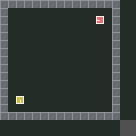
default two-player Melting Pot Coins setup as a PettingZoo ParallelEnv.
Screenshot
API
See the generated Coins API reference for signatures and public objects.
Use the dispatcher:
Or import the substrate module directly:
from mp.coins.coins import CoinsConfig, parallel_env

config = CoinsConfig(regrow_rate=0.0005)
env = parallel_env(config=config, render_mode="rgb_array")
Agents are named player_0 and player_1. Each infos[agent] includes
meltingpot_player_index, which preserves the 1-based player ID used by
Melting Pot.
Actions and observations
The action space is Discrete(7):
| Action | Meaning |
|---|---|
0 |
no-op |
1 |
forward |
2 |
backward |
3 |
step left |
4 |
step right |
5 |
turn left |
6 |
turn right |
Default per-agent observations are:
| Key | Shape | Type |
|---|---|---|
RGB |
(88, 88, 3) |
uint8 |
MISMATCHED_COIN_COLLECTED_BY_PARTNER |
() |
float64 |
state() and render_mode="rgb_array" return the global world RGB frame with
shape (136, 136, 3).
Mechanics
Coins regrow stochastically on open coin sites. Each player has a preferred
coin type. Collecting any coin gives the collector +1; collecting the other
player's coin gives that partner -2 and raises the partner's
MISMATCHED_COIN_COLLECTED_BY_PARTNER observation for that step.
Reward strategy and failure modes
The cooperative optimum is simple but fragile: each player collects their own coin type and leaves the partner's type alone, so both accumulate positive reward without imposing mismatch penalties. Agents can use the mismatch signal as feedback that the partner has just defected from this norm.
Bad equilibria include mutual over-harvesting, where both players greedily collect every visible coin and repeatedly penalize each other, and retaliatory cycles where one mismatch triggers the other player to collect mismatched coins in response. Those policies can look locally rewarding to the collector while driving joint reward down.
Playable notebook
Launch the playable notebook with:
Controls:
- WASD or arrow keys move the active player.
- Q/E turn the active player.
- TAB switches the controlled player.
- ESC closes the pygame window.
The notebook uses a higher default coin regrow rate for playability. The environment default remains parity-oriented.