Predator Prey
Predator Prey is available as a native four-variant PettingZoo family:
| Variant | Upstream alias | Default roles | World RGB |
|---|---|---|---|
open |
predator_prey__open |
3 predators, 10 prey | (152, 184, 3) |
alley_hunt |
predator_prey__alley_hunt |
5 predators, 8 prey | (184, 208, 3) |
orchard |
predator_prey__orchard |
5 predators, 8 prey | (152, 184, 3) |
random_forest |
predator_prey__random_forest |
5 predators, 8 prey | (152, 184, 3) |
All variants expose the same action order, stamina observation, native RGB
renderer, optional global observations, apple/acorn mechanics, predation, prey
group defense, and respawn behavior. random_forest expands upstream Q and
M map-helper cells on reset using the environment RNG.
Screenshots
| Variant | Screenshot |
|---|---|
| Open | 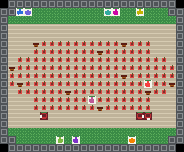 |
| Alley Hunt | 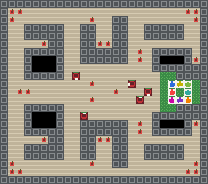 |
| Orchard | 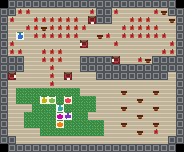 |
| Random Forest | 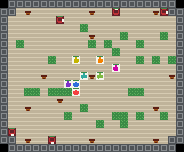 |
API
See the generated Predator Prey API reference for signatures and public objects.
Use the family dispatcher:
from mp.predator_prey import env, parallel_env

parallel = parallel_env("orchard", render_mode="rgb_array")
aec = env("predator_prey__random_forest")
Or import a variant directly:
from mp.predator_prey.orchard import PredatorPreyOrchardConfig, parallel_env

config = PredatorPreyOrchardConfig(observation_mode="global")
env = parallel_env(config=config, render_mode="rgb_array")
Agents are named player_0 through player_12. Each infos[agent] includes
meltingpot_player_index, preserving Melting Pot's 1-based player ID.
Actions and observations
The action space is Discrete(8):
| Action | Meaning |
|---|---|
0 |
no-op |
1 |
forward |
2 |
backward |
3 |
step left |
4 |
step right |
5 |
turn left |
6 |
turn right |
7 |
interact |
Default per-agent observations are:
| Key | Shape | Type |
|---|---|---|
RGB |
(88, 88, 3) |
uint8 |
STAMINA |
() |
float64 |
Pass observation_mode="global" to a variant config to return the full world
RGB frame as each agent's RGB observation.
Mechanics
Prey collect apples for +1. Prey can also pick up acorns, then interact while
fully rested to eat them over multiple frames for 18 total reward. Apples
regrow at 0.007; acorns regrow at 0.01.
Predators interact with the adjacent tile to eat prey. A prey is eaten when the nearby non-red, non-eating prey group is no larger than the nearby non-red predator group within radius 3. Predators can also eat other predators for no reward, costing the hitter stamina. Eaten avatars respawn after 200 frames.
Both roles use stamina. Costly actions drain stamina, no-ops recover stamina, and lower stamina bands slow action cadence. Prey can enter safe grass; predators cannot move onto it, but can still interact with prey on adjacent grass.
Reward strategy and failure modes
Prey maximize reward by foraging efficiently, resting enough to keep stamina high, and clustering when predators approach so group defense prevents kills. Acorns are high-value but require setup, so good prey policies switch between quick apple collection and safe acorn eating. Predators maximize reward by coordinating attacks, isolating prey away from defensive groups, and timing interactions when prey stamina or position makes escape unlikely.
Bad equilibria include prey scattering for food and becoming individually eatable, predators chasing alone and wasting stamina, and both sides camping safe grass boundaries without producing reward. Predator cannibalism gives no reward, so uncontrolled aggression among predators can collapse their own hunt.
Playable notebooks
Launch a playable notebook with:
uv run marimo run notebooks/predator_prey/open_mo.py
uv run marimo run notebooks/predator_prey/alley_hunt_mo.py
uv run marimo run notebooks/predator_prey/orchard_mo.py
uv run marimo run notebooks/predator_prey/random_forest_mo.py
Controls:
- WASD or arrow keys move the active player.
- Q/E turn the active player.
- SPACE interacts: predators eat, prey eat held acorns.
- TAB switches the controlled player.
- ESC closes the pygame window.
The notebooks expose higher food-regrowth controls and a shorter acorn-eating duration for playability. The environment defaults remain parity-oriented.